WooCommerce WordPress themes decide how fast your store loads and how easily shoppers reach the checkout. This list covers five themes from the Agratri collection for online stores of different sizes. Each pick has a preview image, a short description, key features and a link to its page.
A store theme has more work to do than a blog theme. It must show products clearly, filter them quickly and keep the cart close. So the right choice depends on what you sell and how many products you plan to list. We explain each theme in plain words, then show you how to choose.
Who these WooCommerce WordPress themes suit
Three kinds of sellers use WooCommerce WordPress themes most. First, new store owners need a theme with ready-made demos, so they can launch fast. Second, growing shops need tools that raise the value of each order. Third, marketplace and comparison sites need layouts that go beyond a normal shop.
Each group has a different priority. For example, a small boutique wants clean product pages, while a deal site wants comparison tables. So the best theme for one seller may be a poor fit for another. Keep your own plan in mind as you read the picks.
How we picked these WooCommerce WordPress themes
These are picks from the Agratri collection, not an independent ranking. We read every product page and kept only the themes that fit online selling. Then we listed only the features each page states.
We checked each theme against five points:
- Fit for online stores, with shop, product and cart layouts
- A responsive layout that works on phones and tablets
- Demo content or ready-made homepages, so you can start fast
- Store tools such as filters, wishlist, compare and quick view
- Updates and compatibility with current WordPress and WooCommerce versions
No theme wins on every point. For example, a theme with a huge demo library gives you more choice, but it also takes longer to learn. So think about your products and your team before you decide.
Quick comparison of the five picks
Start with this table, then read the notes on each theme.
| Theme | Type | Best for | Details |
|---|---|---|---|
| XStore | WordPress theme | Stores of almost any niche | View details |
| MinimogWP | WordPress theme | Stores that want bigger orders | View details |
| Elessi | WordPress theme | Fast browsing with AJAX tools | View details |
| Saren | WordPress theme | Design-led, animated shops | View details |
| REHub | WordPress theme | Marketplaces and comparison sites | View details |
All five are WordPress themes. For a different kind of site, see our guide to the best WordPress theme for a business website.
The five picks in detail
1. XStore: multipurpose WooCommerce theme for almost any store

XStore is a multipurpose theme built for online shops and retail. The product page lists fashion, electronics, furniture, food, beauty and many other niches. So it is one of the WooCommerce WordPress themes that suits a store with a wide range of products.
It also bundles the tools most shops add later. As a result, you may need fewer extra plugins. The page says the theme is optimized for Google PageSpeed, but you should still test the demo yourself.
Key features
- 140 or more ready-to-import demos
- Wishlist, product compare, color and size swatches and AJAX filters
- Drag and drop header builder and a mega menu
- Advanced Theme Options for layout, typography and colors
- Quick setup wizard and one-click demo installer
2. MinimogWP: eCommerce theme built to raise order value
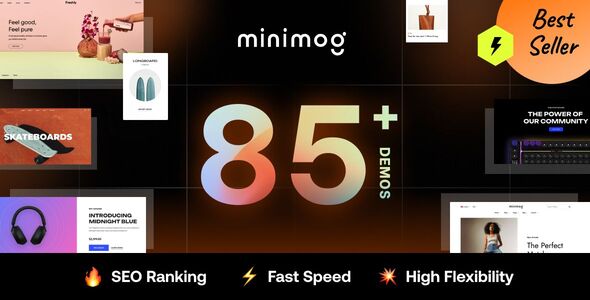
MinimogWP focuses on conversion. Its product pages include bundles, cross-selling and urgency tools. Because of that, it suits a shop that already has traffic and wants more value from each visit.
The product page also says the theme loads sliders, icon fonts and scripts only where they are used. In addition, it lists compatibility with WooCommerce High-Performance Order Storage.
Key features
- 80 or more demos you can import in one click
- 120 or more Elementor widgets, with 30 or more made for WooCommerce
- 12 header styles and 30 or more footer styles
- Bundled plugins such as Product Bundles, Frequently Bought Together, Wishlist and Compare
- Accessibility features and a built-in captcha system for forms
3. Elessi: WooCommerce AJAX theme with RTL support
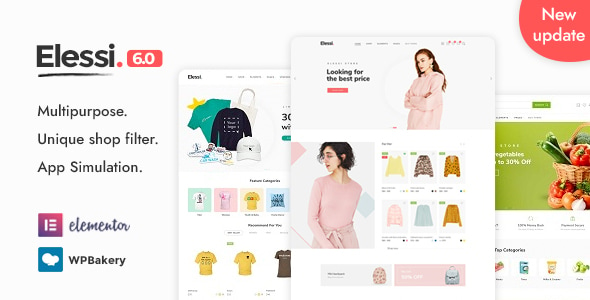
Elessi is a clean WooCommerce theme made around the shopping experience. Its AJAX tools let shoppers search, filter and view products without reloading the page. It also supports right-to-left languages, which matters if you sell in Arabic or Hebrew.
The product page lists many demos for niches such as watches, furniture, bikes, bags and cosmetics. Among WooCommerce WordPress themes, Elessi is a good fit when browsing speed and filters matter most.
Key features
- 38 or more homepage layouts
- Instant AJAX search with thumbnails
- Off-canvas wishlist and cart sidebar, plus product quick view
- Shop grid and list views, with several sidebar options
- Child theme support, RTL support and a header and footer builder
4. Saren: multi-concept WooCommerce theme with motion
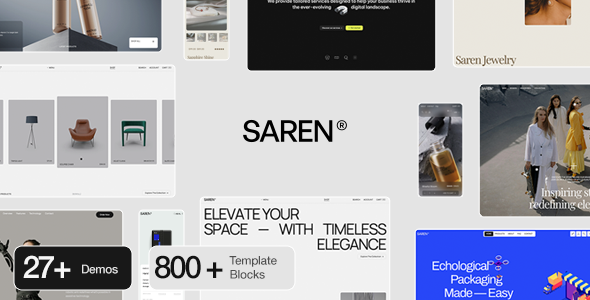
Saren is a design-led theme for shops that want a memorable look. It is built with Elementor and works with WooCommerce. Motion is part of the style, with page transitions, smooth scrolling and an interactive mouse cursor.
Motion adds polish, but it also needs good photography to work well. So choose Saren if your brand relies on strong visuals. Among WooCommerce WordPress themes, it is the most design-led pick here.
Key features
- Landing page included
- AJAX page transitions and GSAP animation
- Smooth scroll plugin and interactive mouse cursor
- Parallax scroll effects and Swiper sliders
- Classic and fullscreen menu styles, with documentation included
5. REHub: price comparison and multi vendor marketplace theme

REHub is a hybrid theme, so it covers more than a plain shop. The product page lists multi vendor shops, price comparison, deal and coupon sites, affiliate blogs and review sites. Each part can be used alone or combined with the others.
It suits a seller who wants to run a marketplace or a comparison site on WooCommerce. However, a theme with this many models takes more time to set up. So plan your site first, because REHub is the broadest of the WooCommerce WordPress themes in this list.
Key features
- Multi vendor and e-commerce shop support
- Price and product comparison, with specification and review builders
- Deal, coupon and affiliate site functions
- Bonus plugins listed on the product page, including WooCommerce tools
- Revolution Slider included
Which theme fits which kind of store
Match the theme to your store size and goal. First, a small shop with a few products needs a simple layout and a fast demo. Next, a large catalog needs strong filters and search. Finally, a marketplace needs vendor and comparison tools.
Here is a simple way to read the list:
- Large catalog with many categories: XStore or Elessi
- Shop that wants bigger baskets: MinimogWP
- Brand that sells through design and motion: Saren
- Marketplace, deals or comparison site: REHub
This is only a starting point. Open two or three demos on your phone, because a quick look often settles the choice. Many WooCommerce WordPress themes look similar in screenshots but feel very different in use.
What to look for in a WooCommerce theme
Good WooCommerce WordPress themes save you weeks of work, while a poor fit costs sales. Use these seven checks before you buy. The official WooCommerce guide to choosing a theme covers the same ground.
- Product page layout. Shoppers decide on this page, so check images, variations and the add to cart button.
- Speed. A slow store loses buyers before checkout. Test the live demo with Google PageSpeed Insights and compare the results.
- Mobile layout. Many shoppers buy on a phone, so check filters, menus and the cart on a small screen.
- Store tools. Look for filters, wishlist, compare and quick view. Built-in tools mean fewer extra plugins.
- Compatibility. Check that the theme works with current WordPress and WooCommerce versions, and that the seller keeps releasing updates.
- Easy editing. Your team should change text and images without a developer. A page builder and demo content make that easier.
- Clean, trusted code. Follow our steps to check whether a WordPress theme is safe before you install any theme. Our guide on free and premium WordPress themes explains the risks.
A five-minute test for WooCommerce WordPress themes
Before you buy, run this quick test on the live demo. It takes about five minutes and shows most problems.
- Open the demo on your phone, then tap the menu, the filters and the cart.
- Run the demo shop page through PageSpeed Insights and note the mobile result.
- Open a product page and check the images, the variations and the buy button.
- Read the product page to see what the package includes, such as demo content or a child theme.
- Confirm that the homepage you like is part of the package.
If one of the WooCommerce WordPress themes passes all five checks, you can buy with more confidence. If it fails one, ask yourself whether you can fix the problem easily.
When a custom store build makes more sense
A ready-made theme is a strong start. However, some stores need more. For example, you may want a custom checkout, a link to your stock system or a very fast shop. In that case, a custom build saves time later.
You do not have to start from zero. Many shops adjust one of the WooCommerce WordPress themes above, then grow from there. See our WooCommerce development service or the performance optimization service if you want help.
Frequently asked questions about WooCommerce WordPress themes
Which WordPress theme is best for WooCommerce?
Among WooCommerce WordPress themes, the best fit depends on your store. XStore and Elessi suit shops with many products, while MinimogWP focuses on order value. Test each demo on a phone before you decide.
Do I need a special theme for WooCommerce?
No, but a WooCommerce-ready theme helps. It styles the shop, product, cart and checkout pages to match your site. A general theme can leave those pages looking plain.
Can I use a multipurpose theme for an online store?
Yes, if it ships shop layouts. XStore, Saren and Elessi all state WooCommerce support on their product pages. Open the demos first, because the layouts must match your products.
Are WooCommerce WordPress themes good for SEO?
A theme supports SEO, but it cannot rank a store alone. Clean code, fast pages and clear headings help. However, your product pages and content matter more. XStore, MinimogWP and Elessi all mention SEO on their product pages, so check each demo for speed and structure.
Should I choose a ready-made theme or a custom build?
Choose a ready-made theme if you want to launch soon and your needs are common. Choose a custom build if you need special checkout or stock features. Many stores start with a theme and add custom work later.
Pick your theme and start selling
Choose the theme that fits your products, and you will finish your shortlist of WooCommerce WordPress themes quickly. Browse all WordPress themes and HTML templates from Agratri, or contact the Agratri team if you want help to choose.
Last reviewed: October 2026