Education WordPress themes need to do three jobs well. They must present your programs clearly, make enrolling simple and work on a phone. This list covers three education WordPress themes from the Agratri collection for schools, colleges, universities and online course sites. Each pick has a preview image, a short description, key features and a link to its page.
Choosing one is hard because an education site serves several groups at once. Parents want admissions details, students want course information and teachers want an easy way to publish. So the best education WordPress themes keep all three groups in mind. We used that idea to shortlist the picks below, and we explain each one in plain words.
Who these education WordPress themes suit
Three kinds of buyers use education WordPress themes most. First, schools, colleges and universities need pages for programs, faculty and admissions. Second, course creators need a catalog, lesson layouts and a way to sell access. Third, coaches and tutors need a simple site that builds trust and fills a calendar.
Each group has a different priority. For example, a university leads with programs and campus life, while a coach leads with a personal story and a clear offer. So the right theme for one group may be wrong for another. Keep your own group in mind as you read the picks.
How we picked these education WordPress themes
These are picks from the Agratri collection, not an independent ranking. We read every product page and kept only the themes built for education or teaching. Then we listed only the features each page states. We checked each theme against five points:
- Fit for education work, such as courses, teachers, programs or coaching offers
- A responsive layout that works on phones and tablets
- Demo content or ready-made homepages, so you can start fast
- Visual editing tools, so you do not need to write code
- Support for course or shop plugins, where the product page says so
No theme wins on every point. For example, a theme with many demos gives you more choice, but it also takes longer to learn. So think about your own team and your own plan before you decide.
Quick comparison of the three picks
Start with this table, then read the notes on each theme.
| Theme | Type | Best for | Details |
|---|---|---|---|
| Educavo | WordPress theme | Schools, colleges and online course sites | View details |
| Estudiar | WordPress theme | Universities, colleges and schools | View details |
| Mudarib | WordPress theme | Coaches, tutors and course creators | View details |
All three are WordPress themes. If you prefer plain HTML, we cover that choice in the buying guide further down.
Which of these education WordPress themes fits your project
Start with your main goal. If you run an institution, you need clear pages for programs, staff and admissions. In that case, Estudiar is the closest match on paper, because its page names schools, colleges and universities first.
If you plan to sell courses, you need a course plugin and matching layouts. So look at Educavo, which lists demo content for three course plugins. It also names schools and training centers, so it works for a mixed site that has both.
If you are a solo expert, you need a simple site that explains your offer. For that, Mudarib fits best, because it is made for coaches, mentors and tutors. It also includes a booking plugin for appointments, as its page states.
Whatever you choose, open the demo and test it with your own content. The education WordPress themes in this list look different once your real course names and photos are inside.
The three picks in detail
1. Educavo: education LMS WordPress theme for schools and courses
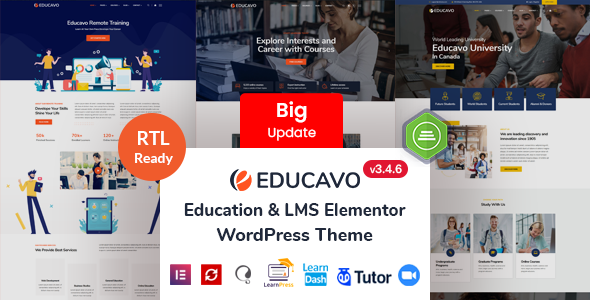
Educavo is built for selling online courses and for running institutions. Its page lists universities, colleges, schools, training centers and kindergartens as suitable uses. It also names workshops and course hubs. As a result, one theme can cover a small academy or a larger campus.
The package includes demo content for three course plugins: LearnPress, LearnDash and Tutor LMS. So you can test the course layout that matches your plugin before you commit. It also lists a WooCommerce demo, which helps if you plan to sell courses or materials.
Note that Educavo runs on Elementor and includes a commercial slider plugin. That gives you design freedom, but it also means more to learn. Run a short test of the demo import first. The page also states that you can download updated versions after your first purchase, so the theme can keep pace with WordPress.
Key features
- 15 demo homepages and 85+ inner pages, as the product page states
- Demo content for LearnPress, LearnDash and Tutor LMS
- Elementor page builder with 120+ addon elements
- One-click demo import and a child theme in the package
- WPML ready and RTL ready, plus WooCommerce support
2. Estudiar: university and school WordPress theme
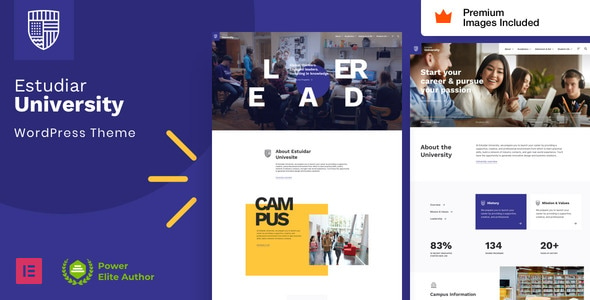
Estudiar is a clean, modern theme for schools, colleges and universities. Its page also names academies, institutes and training institutes. It aims to present programs, admissions and campus life in a clear way. So it suits an institution that wants to look credible and welcoming.
The theme is built with Elementor Pro widgets instead of its own option panel. As a result, you edit styles through the Elementor Pro global styles. This keeps the workflow simple for beginners. However, the page says Elementor Pro is required for the demo importer and the theme setup, so plan for that license.
The page also describes an Elementor Pro WooCommerce builder with a wishlist, AJAX search and gift cards. That helps if you sell books or course materials online. In addition, the theme code only extends the Elementor widgets, and the page says you can remove it widget by widget. As a result, the setup stays simple over time.
Key features
- Built with Elementor Pro widgets, with the global styles panel used as the theme panel
- Header, footer, mega menus, forms and pop-ups built with Elementor Pro
- Dynamic layouts for blog posts, archives, 404 pages and search results
- Premium stock images from the demo included in the package
- RTL support, a setup guide and 23 HD video tutorials for beginners
3. Mudarib: coach and online courses WordPress theme
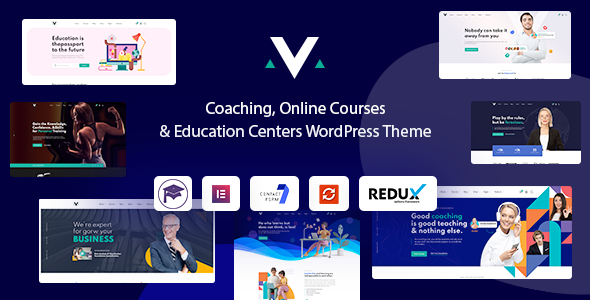
Mudarib is made for coaches, speakers, mentors, instructors, teachers and tutors. It also lists consultants. It suits a solo expert who sells courses or sessions. The page lists more than ten ready-made demos that install in one click.
It includes a courses carousel and grid widget, so you can show your classes in a clean layout. It also lists LearnPress support and the Booked plugin for appointments. So a coach can offer online courses and booked sessions on one site. The package also lists documentation and video guides for setup, so a first-time site owner is not left alone. For more on this niche, read our guide on how to choose a WordPress theme for coaches.
Key features
- 10+ pre-built websites and 50+ inner pages
- 80+ Elementor elements, plus 10+ header and 10+ footer templates
- One-click demo installation, with a mega menu and a header and footer builder
- LearnPress ready, Booked plugin included and WooCommerce ready
- Mailchimp, Contact Form 7, WPML and Polylang support, plus a child theme
What to look for in education WordPress themes
Good education WordPress themes save you weeks of work, while a poor fit costs time and students. Use these seven checks before you buy.
- Course and program layouts. Visitors need to find classes fast, so look for course lists, teacher pages and admissions layouts.
- Course plugin fit. If you sell courses, check which plugin the theme supports. Popular choices include LearnPress and Tutor LMS.
- Speed. A slow site loses visitors before they read your pitch. Test the live demo with Google PageSpeed Insights and compare the results.
- Mobile layout. Many students and parents open your site on a phone, so check menus, buttons and forms on a small screen.
- Easy editing. Your staff should change text and images without a developer. A page builder and demo content make that easier.
- Safe customization. A child theme lets you change templates without losing your edits when the theme updates.
- Clean, trusted code. Follow our steps to check whether a WordPress theme is safe before you install any theme.
Platform fit matters too. Choose WordPress when you want to publish courses, news and events yourself. A small static site can work with plain HTML, so read our guide on HTML templates versus WordPress themes before you decide.
A five-minute test for education WordPress themes
Before you buy, run this quick test on the demo. It takes about five minutes and shows most problems.
- Open the demo on your phone, then tap the menu, the buttons and the contact form.
- Run the demo page through PageSpeed Insights and note the mobile result.
- Open a course page and ask whether a student can see the price, the teacher and the next step.
- Read the product page to see what the package includes, such as demo content or a child theme.
- Confirm that the homepage you like is part of the package.
If one of the education WordPress themes passes all five checks, you can buy with more confidence. If it fails one, ask yourself whether you can fix the problem easily.
When a custom build makes more sense
A ready-made theme is a strong start, and it covers most needs. However, some institutions need more. For example, you may want a student portal, a custom application form or a link to your own systems. In that case, a custom build saves time later.
You do not have to start from zero. Many teams first adjust one of the themes above, then grow from there. Read our guide on theme customization versus a custom theme to compare both routes. If you want help, see the theme customization service or the theme development service.
Frequently asked questions about education WordPress themes
Which WordPress theme is best for a school website?
The best fit depends on your plan. Estudiar is aimed at schools, colleges and universities, so it suits an institution that lists programs and admissions. Educavo also names schools and adds course layouts. Open each product page and compare the demos with your own pages.
Do I need a course plugin to sell courses?
Yes, in most cases. A theme styles your pages, while a plugin handles lessons, quizzes and enrollment. Educavo lists demo content for LearnPress, LearnDash and Tutor LMS. Mudarib lists LearnPress support.
Can I use education WordPress themes for a coaching business?
Yes, if the theme ships suitable layouts. Mudarib is made for coaches, mentors and tutors, and it includes a courses widget and the Booked plugin. However, check the demos first, because your offer and your pages must match the layout.
Do these themes need a page builder?
All three list Elementor on their product pages. Estudiar needs Elementor Pro, while the others list the Elementor page builder. Check the license you need before you buy.
Should I choose a WordPress theme or an HTML template?
Choose WordPress if you want to manage courses, news and events yourself. An HTML template suits a small static site. Our comparison of HTML templates and WordPress themes explains the trade-offs.
Pick your theme and start building
Choose the theme that fits your programs, and you will finish your shortlist of education WordPress themes quickly. Browse all WordPress themes and HTML templates from Agratri, or contact the Agratri team if you want help to choose.
Last reviewed: October 2026