Buy an HTML template if you want a fast, simple site that you rarely change and you are comfortable editing code. Buy a WordPress theme if you want to update pages, add blog posts and grow the site without touching code. The right choice depends less on the design and more on who will edit the site, and how often.
This guide compares both options on the things buyers actually worry about: speed, editing, cost, skills, SEO and room to grow. At the end you will find a short decision path and answers to the questions people ask most.
What is the difference between an HTML template and a WordPress theme?
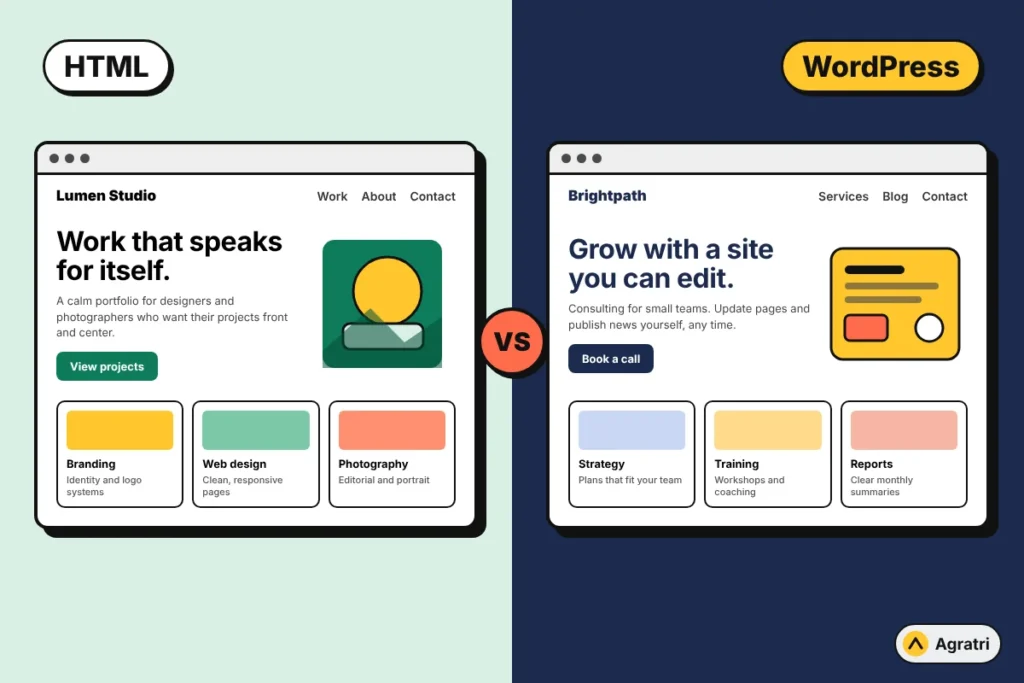
An HTML template is a set of ready-made pages built with HTML, CSS and JavaScript. You open the files, replace the text and images, and upload the finished pages to your hosting. There is no database and no admin dashboard. What you see in the files is what visitors get.
A WordPress theme is the design layer for the WordPress content management system. You install it from your dashboard, then add and edit pages in a visual editor. Your content lives in a database, and the theme turns it into pages when someone visits.
Both can look identical to a visitor. The difference is how the site is built, edited and maintained behind the scenes.
HTML template vs WordPress theme: side by side
- Editing content: HTML means changing code in a text editor. WordPress means typing in a visual editor and clicking Update.
- Speed: A static HTML page has less work to do on each visit, so it starts from a faster baseline. A WordPress site can also be fast, but it needs good hosting, caching and a disciplined plugin list.
- Skills needed: HTML needs basic comfort with code and file uploads. WordPress needs a short learning curve for the dashboard, but no coding for everyday edits.
- Blog and new pages: HTML means copying a page file and editing it by hand. WordPress has posts, categories and pages built in.
- Forms, search and extras: HTML needs a third-party form service or custom code. WordPress offers plugins for forms, search, security and more.
- Maintenance: A static HTML site has very little to update. WordPress needs regular updates to core, theme and plugins.
- Hosting: HTML runs on almost any basic host. WordPress needs PHP and a database, which most hosts provide.
Speed and performance
HTML templates have a natural advantage here. Each page is a ready file, so the server does not need to query a database or run PHP before sending it. If your site is a small portfolio or a one-page landing site, this can make a real difference on slow connections.
That said, speed is not decided by the format alone. Large images, heavy scripts and too many animations slow down both kinds of sites. A well-built WordPress theme on decent hosting, with caching and optimized images, can load quickly too. If a WordPress site feels slow, find the real cause, such as images or plugins, before you decide to switch platforms.
Editing and updating your content
This is where most buyers should spend their thinking time. Ask yourself how often the site will change.
- If you will publish a few projects a year and then leave the site alone, HTML is perfectly fine.
- If you plan to add case studies, news or articles every month, WordPress saves you hours. You write, preview and publish from one screen.
- If someone else on your team, such as a marketer or assistant, will update the site, WordPress is the safer choice because they do not need to touch code.
With HTML, even a small change, such as fixing a phone number that appears in the header of ten pages, means editing every file. WordPress stores shared parts such as the header and footer once.
Cost: what you really pay for
Compare the full cost, not only the price on the product page. HTML templates usually cost less to buy, and they run on cheaper hosting. But if you are not a developer, add the hours you will spend editing code, or the fee for someone to do it.
A WordPress theme may cost a little more, and you may want a few plugins, but the setup is faster for non-technical buyers. When the same design is sold in both formats, you can compare the two listings directly and see exactly what the extra money gets you.
You may also want changes to the design itself. With a WordPress theme, a developer can reshape colors, layouts and sections for you. Our theme customization service works on any WordPress theme, including ones bought elsewhere.
SEO: can an HTML site rank as well as WordPress?
Yes. Search engines rank pages on content quality, relevance, speed and structure, not on the platform. A clean HTML template with good headings, fast loading and useful content can rank very well.
WordPress makes the ongoing work easier. Publishing articles, organizing them in categories, linking related posts and editing page titles are all routine tasks. If content marketing is part of your plan, that convenience adds up. If you are building a portfolio, our guide on how to build a portfolio website with WordPress walks through domain, hosting, case studies and SEO step by step.
Which one fits you? Four common buyers
Freelance designers and photographers
If you show 6 to 12 projects and update them a few times a year, an HTML template keeps the site light and cheap. If you add work often or want a blog, choose WordPress.
Developers
You can edit HTML comfortably and may prefer full control of the files. An HTML template is a strong starting point. If a client will edit the site later, give them WordPress.
Small business owners
You want to update opening hours, services and news without calling a developer. WordPress is almost always the better fit.
Small agencies
You need case studies, a blog and several people editing. WordPress, usually with a page builder, is the practical choice.
How to decide in six steps
- Count your pages. Five to ten fixed pages suit HTML. More than that, or a growing blog, points to WordPress.
- Decide who edits the site. If it is not you, or you are not comfortable with code, pick WordPress.
- Estimate how often content changes. Monthly or more often favors WordPress. A few times a year favors HTML.
- List the features you need. Contact forms, search, memberships or a store lean toward WordPress. A simple showcase leans toward HTML.
- Check your hosting budget and skills. HTML runs almost anywhere. WordPress needs PHP and a database, and some routine updates.
- Preview before you buy. Open the live demo on your phone, check the page structure and confirm the template includes the inner pages you need.
Can you start with HTML and move to WordPress later?
You can, but it is not a button click. An HTML design has to be rebuilt as a WordPress theme, which is development work. If you think you will need WordPress within a year, start there. If you are unsure, look for a design sold in both formats so you can move without redesigning.
Some designs on Agratri are offered both ways. For example, the personal portfolio design Truiall is available as an HTML template and as a WordPress theme, so you can pick the format that matches how you work.
Frequently asked questions
Is an HTML template faster than a WordPress theme?
Usually it starts faster, because pages are static files with no database work. A well-optimized WordPress site can still load quickly, so image size, scripts and hosting matter as much as the format.
Do I need coding skills to use an HTML template?
You need basic HTML and file-upload skills to replace text, images and links. If you do not want to edit code, a WordPress theme is easier.
Which is better for SEO, HTML or WordPress?
Neither wins on its own. Rankings depend on content, structure and speed. WordPress makes publishing and organizing content easier, while HTML can be leaner.
Can I use an HTML template inside WordPress?
Not directly. An HTML template has to be converted into a WordPress theme, which is a development task. Buying the WordPress version of a design, when one exists, avoids that work.
Which is cheaper, an HTML template or a WordPress theme?
HTML templates often cost less to buy and host. For non-developers, WordPress can be cheaper overall because editing takes less time.
Choose the format, then make it yours
If you are still unsure which format fits your project, tell us about your site and we will point you to the right option. Every theme and template in our store is reviewed and malware-scanned before it is listed, so you can focus on content and customers.