WordPress speed optimization cost depends on what slows your site down, not on how big your theme is. A simple fix, such as compressing images and setting up caching, takes little time. A busy store with heavy plugins and failing Core Web Vitals takes far more. This guide shows what drives the price, how providers charge, and what to check before you ask for a quote.
Use it as a buyer’s checklist. By the end, you will know which questions to ask. You will also know which WordPress speed optimization cost quotes to avoid.
What drives WordPress speed optimization cost
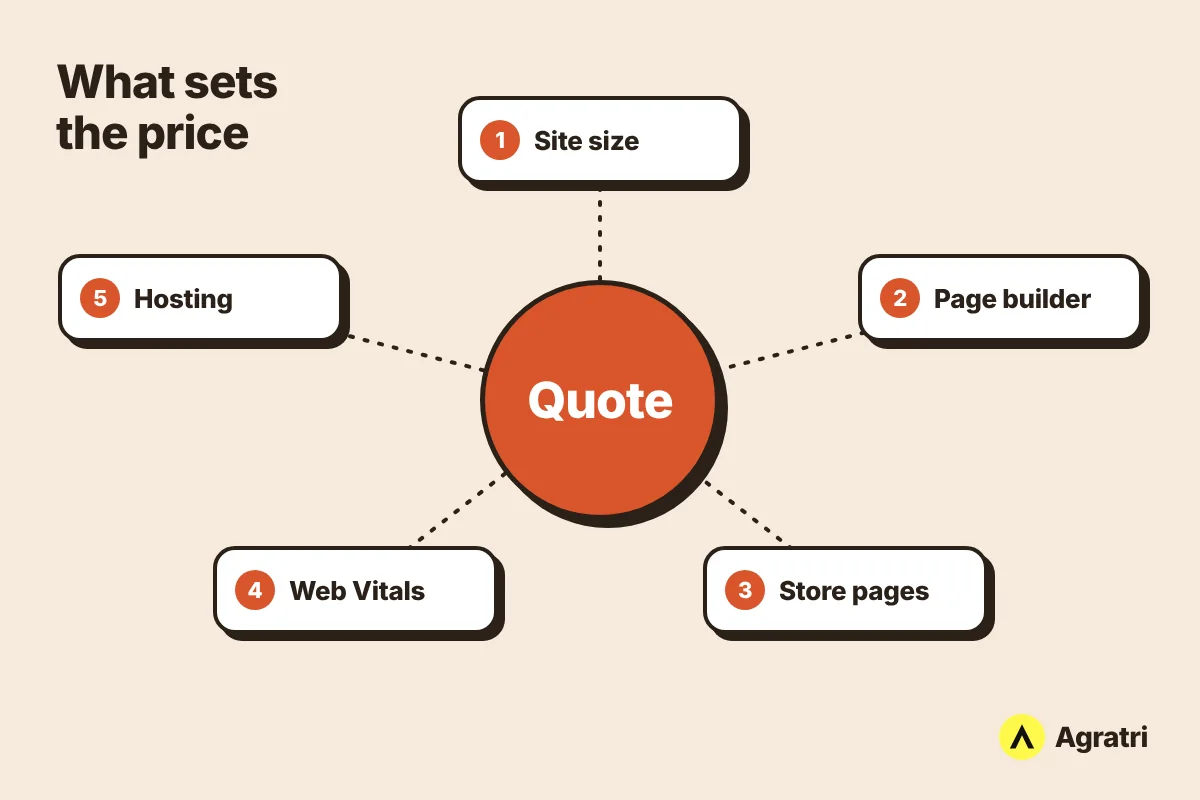
Every site is slow for different reasons. So the price changes from one project to the next. Providers usually look at five things before they name a figure.
Site size and plugin load
A five-page business site is quick to review. A site with hundreds of posts, many plugins and years of old data is not. More plugins mean more code to check. As a result, the work takes longer and the WordPress speed optimization cost rises.
Page builders and heavy themes
Page builders add layers of markup and scripts. Some themes also load features you never use. Fixing this can mean removing unused assets or changing how pages load. If you are still choosing a theme, our guide to the best WordPress theme for a business website explains how to pick a light one.
WooCommerce and dynamic pages
Stores are harder to speed up than brochure sites. Cart, checkout and account pages cannot be cached like a blog post. Therefore, store work needs extra testing and a higher WordPress speed optimization cost. This is also why WooCommerce development costs more than a simple site.
Core Web Vitals problems
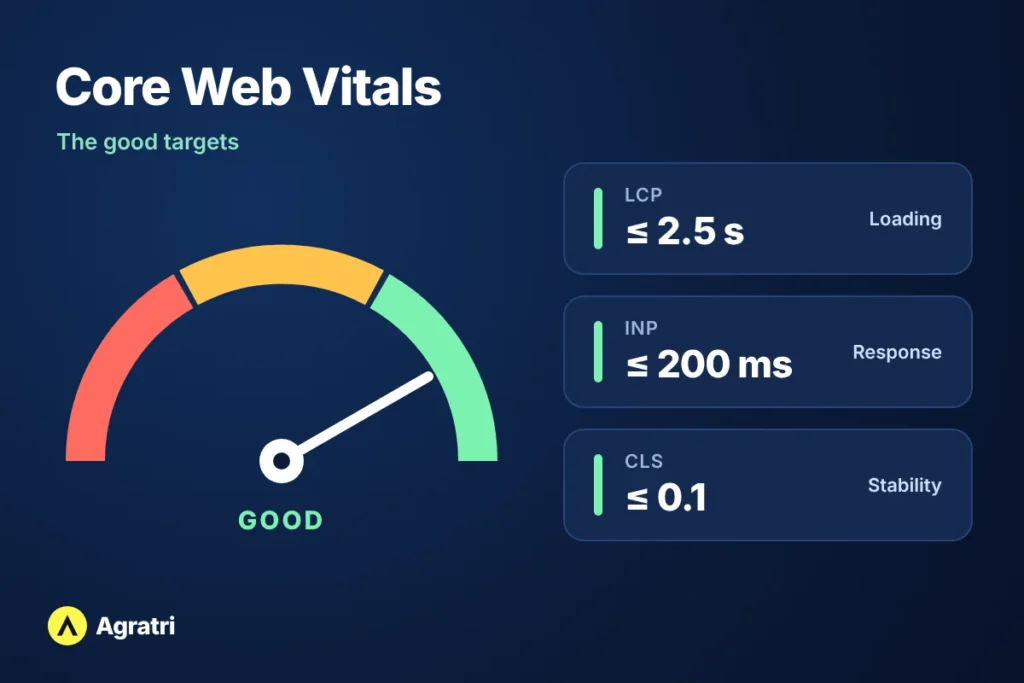
Core Web Vitals are Google’s measures of real user experience. They cover loading, responsiveness and visual stability. If your pages fail one or more of them, the fix list grows. Google explains how they relate to search in its Core Web Vitals documentation.
The good targets are simple to remember. Largest Contentful Paint (LCP) should be 2.5 seconds or less. Interaction to Next Paint (INP) should be 200 milliseconds or less. Cumulative Layout Shift (CLS) should be 0.1 or less. Google measures these at the 75th percentile of real visits, as web.dev explains.
Hosting limits
Sometimes the server is the bottleneck. A slow host limits what any plugin or code change can do. In that case, a provider may advise a move. That becomes a separate line in your WordPress speed optimization cost, apart from the tuning work itself.
How providers price speed work
Public WordPress speed optimization cost figures vary a lot. In the published offers we reviewed, basic marketplace gigs started at a low double-digit amount. Full consulting and build packages reached around one thousand dollars. Treat these as rough signals, not quotes. Your own site decides the real figure.
Providers also bill in different ways. Knowing the three common models helps you compare offers fairly.
Fixed price per project
A fixed price covers a defined list of fixes. You know the total WordPress speed optimization cost before work starts. This suits most small business sites. However, the scope must be written down, or the price means little.
Hourly billing
Some developers charge by the hour. This can work for small, unclear problems. On the other hand, the final bill is hard to predict. Ask for an estimate cap before you agree.
Monthly plans
Monthly plans bundle speed checks with updates and backups. They fit sites that change often. Speed also drifts back over time as you add plugins and content. A WordPress maintenance plan keeps those checks regular. Ask whether a monthly plan changes the WordPress speed optimization cost over a full year.
What a speed optimization service should include
A clear quote lists the work in plain words. Compare each offer against this list.
- Performance audit: a review of what slows each key page.
- Core Web Vitals fixes: targeted work on LCP, INP and CLS problems.
- Image optimization: smaller files and modern formats.
- Caching and minification: less work for the server and the browser.
- Database and plugin cleanup: removing what you no longer use.
- Render-blocking script fixes: so pages show content sooner.
- Safe backups: a restore point before any change.
- Before and after report: proof of what changed.
If an offer skips the backup or the report, ask why. Those two items protect you the most.
How to check your site before you ask for a quote
A few minutes of prep makes every WordPress speed optimization cost quote easier to compare. It also shows providers that you know what you need. Follow these steps.
- Test your homepage and one key page, such as a product or service page, in PageSpeed Insights.
- Open the Core Web Vitals report in Google Search Console, if your site has enough traffic.
- Note which metric fails: LCP, INP or CLS.
- List your active plugins and mark the ones you no longer use.
- Write down your host, your plan and your theme.
- Save screenshots of your results, so you keep a “before” record.
Next, send this information to each provider. Then compare what each one says about scope, price and timeline. Finally, check that every quote covers the same work.
Should you do it yourself or hire help?
You can fix some things yourself. For example, you can resize large images and remove unused plugins. Many site owners stop there, and that is fine for a small site.
However, deeper work carries more risk. Changing scripts, caching rules or database tables can break pages if you test badly. Hire help when your site earns money, when it fails Core Web Vitals, or when you cannot afford downtime. In those cases, a mistake costs more than the service. Weigh the WordPress speed optimization cost against that risk.
Red flags in a speed optimization quote
Some quotes look cheap but hide gaps. A low WordPress speed optimization cost can mean missing work. Watch for these signs:
- A promised score, such as a perfect result on a test tool.
- No backup before changes.
- No written list of the work.
- Changes made straight on the live site with no testing.
- No before and after numbers.
- A price with no timeline.
Every site is different, so no honest provider can promise a number. What they can promise is measurable before and after results. Look for that instead.
What a fair price looks like
A fair price matches the work, not a trend. For example, a small site with a few heavy images needs a short job. On the other hand, a large store with many plugins needs a longer one. So a fair quote explains why it costs what it does.
Look for three things in every quote. First, the list of fixes should be specific. Second, the timeline should be clear. Third, the report should show results you can check yourself. When all three are present, the WordPress speed optimization cost is easy to defend.
How Agratri prices WordPress speed work
Our WordPress performance optimization service starts with a full audit. After that, you get a clear list of issues, one price and one timeline before work begins. We back up first and apply the fixes on a safe copy. Then we test everything and deploy to your live site.
We do not promise a specific score, because every site is different. We do show measurable before and after results in a speed report. Pricing is fixed and quoted upfront, with no hourly meter. That keeps the WordPress speed optimization cost clear before you commit.
Frequently asked questions
How much does WordPress speed optimization cost?
WordPress speed optimization cost depends on your site size, plugins, builder, store features and Core Web Vitals problems. Published offers range from small marketplace gigs to full consulting packages. The only reliable figure is a written quote for your own site.
Is a one-time fix enough, or do I need a monthly plan?
A one-time fix solves the problems you have today. A monthly plan helps keep speed steady as the site changes. If you rarely update your site, one fix may be enough. If you publish often, ongoing checks make sense.
How long does speed optimization take?
It depends on the size and scope of the work. A good provider gives you a timeline in writing before work begins.
Will faster pages improve my rankings?
Google strongly recommends good Core Web Vitals for success in Search. However, they are only one part of page experience, so good scores alone do not promise top rankings. Faster pages also help visitors stay and finish forms or checkouts.
Do I need to change my theme?
Usually not. Most gains come from fixing images, scripts, caching and plugins on your current setup. A theme change only makes sense if the theme itself is the main cause.
Get a clear price for your site
Now you know what shapes the WordPress speed optimization cost for your site. Next, ask for a quote that lists the work, the price and the timeline. If you want a fixed quote for your own site, contact Agratri and share your site address. We will start with a full audit and send you a clear list of issues before any work begins.